Showing posts with label Mac OS X. Show all posts

Wednesday, April 18, 2012

Installing Ubuntu using VirtualBox on MacOSX

It is a how-to document to install Ubuntu linux on the Mac OS X using Oracle's VirtualBox.
If you manage some operating systems, you should clean up how-to the document.

Prerequisites :
  - Mac OS X 10.7.3 (Mac bundle)
  - Oracle VirtualBox 4.1.12 ( https://www.virtualbox.org/wiki/Downloads )
  - Ubuntu desktop i386 11.10 ISO file ( http://www.ubuntu.com/download/ubuntu/download )

1. Running VirtualBox than make new virtual machine and insert Ubuntu desktop i386 ISO file to DVD(CD)-ROM.

2. Starting the virtual machine which you made, so Ubuntu is run to install.
 
3. (Optional) If you have a japanese keyboard, you should set Japanese-Japanese on the keyboard layout window.
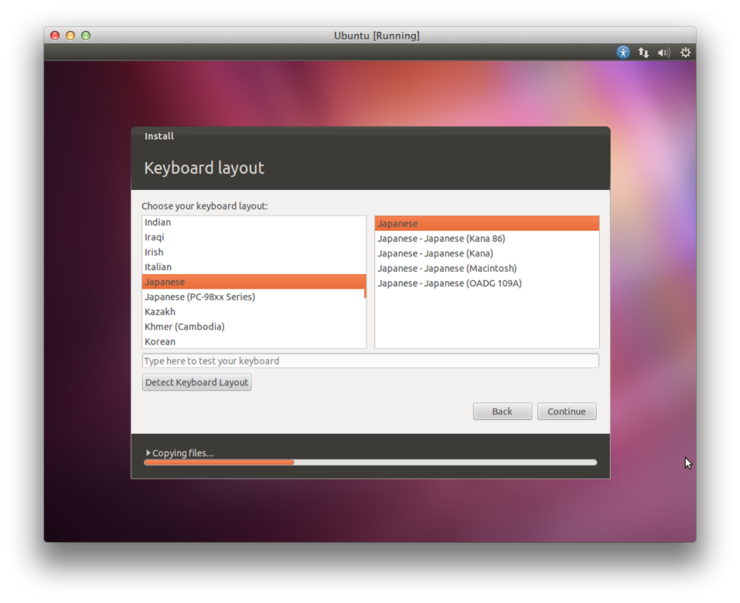
4. Updating Ubuntu software after installing Ubuntu is ended.

5. Set applications as the Terminal application in the left panel.


Sunday, April 15, 2012

Mac OS X + Eclipse + Java


I tried to organize information about how to install eclipse on the mac.
It's very simple, but I'll continue to organize.
1. Running the Terminal.app. Then to check a version. (Version higher then 1.6)
2. Running the Safari.app. Then to access an Eclipse website. (http://www.eclipse.org/)
3. Downloading the latest Eclipse. (Eclipse IDE for Java Developers, 32bit)
4. Moving download file to desktop area.
5. Double-Click to restore an archive file.
6. Verifying an eclipse directory which was completed restoring.
7. Moving an eclipse directory to Application area.
8. Copying a Eclipse.app to dock area for easy running.
9. Running an eclipse.
10. Verifying an eclipse display.
11. Setting an eclipse preferences.